Quarto x Gradio Extension
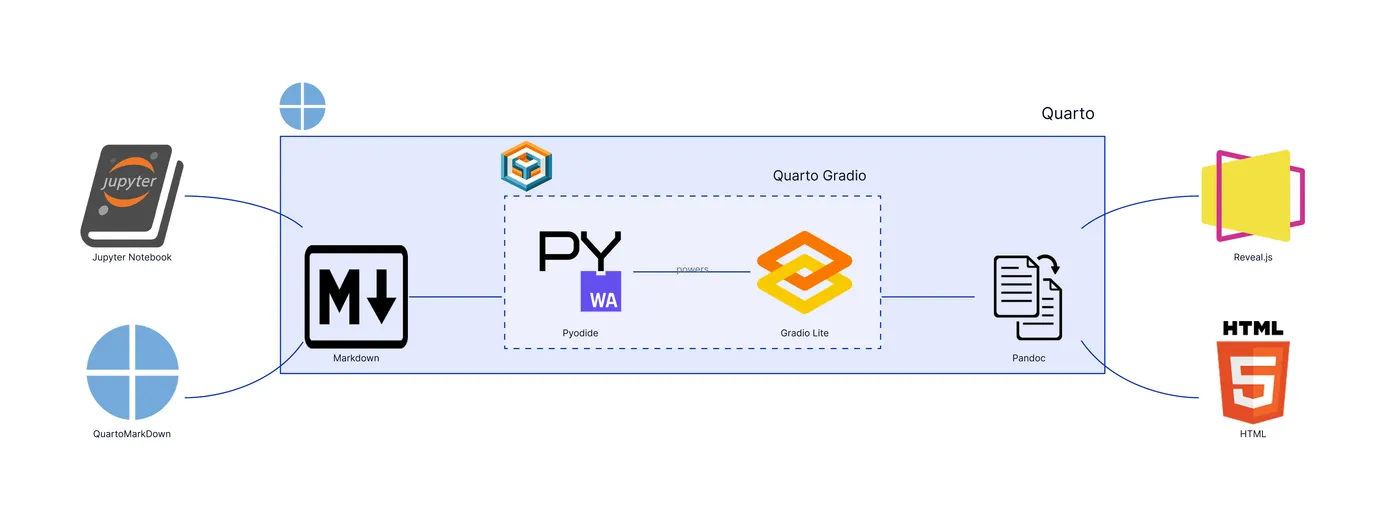
An extension that bridges the gap between static documentation and interactive learning. By embedding runnable UIs directly into Quarto pages, it transforms passive reading into an active, explorable experience, allowing users to experiment with code and observe results instantly, without any backend or local setup.
The fundamental limitation of most technical and educational material is the gap between theory and practice. Static code snippets and screenshots can explain a concept, but they cannot truly demonstrate it, forcing a context switch that breaks the flow of learning. This is especially true when teaching complex mathematical concepts in data science, where understanding often remains abstract until a student can interact with the underlying algorithm.
This project explores a simple way to close that gap by embedding runnable interfaces directly into the documentation. The goal is to transform a static page into a live, interactive playground. For example, instead of just reading about the theory of data compression, a student can directly interact with a live implementation of Huffman encoding on the page itself, turning a passive lesson into an active experiment.
This is made possible by a pragmatic architectural choice: executing the examples entirely in the reader’s browser. By leveraging tools like
Stack
While the problem is more important than the tools, the tech stack tells a story about the project's architecture and trade-offs. Here's what this project is built on:
Platforms & Runtimes
Executes example Gradio interfaces entirely in the browser via Pyodide, enabling serverless app demos within documentation pages
Implements a small client-side UX script that warns mobile users when Gradio Lite content is present and loads site analytics
Drives the Pandoc filter that detects Python cells and injects <gradio-lite> markup so examples render as live apps in the generated site
Runs Python code client-side so Gradio apps in the docs execute in the reader's browser without any backend
Frontend & Visualization
Builds the documentation website and applies the custom Lua filter to embed Gradio Lite apps directly within content pages
Renders interactive Gradio UIs in the browser using <gradio-lite> tags, turning example Python cells into live, serverless apps
Enables optional slide presentations that can include the same embedded, in-browser Gradio app experiences
Provides the site's visual foundation via the Darkly theme so embedded Gradio components match the site's styling
Powers interactive charts inside example Gradio interfaces to demonstrate rich, client-side visualizations